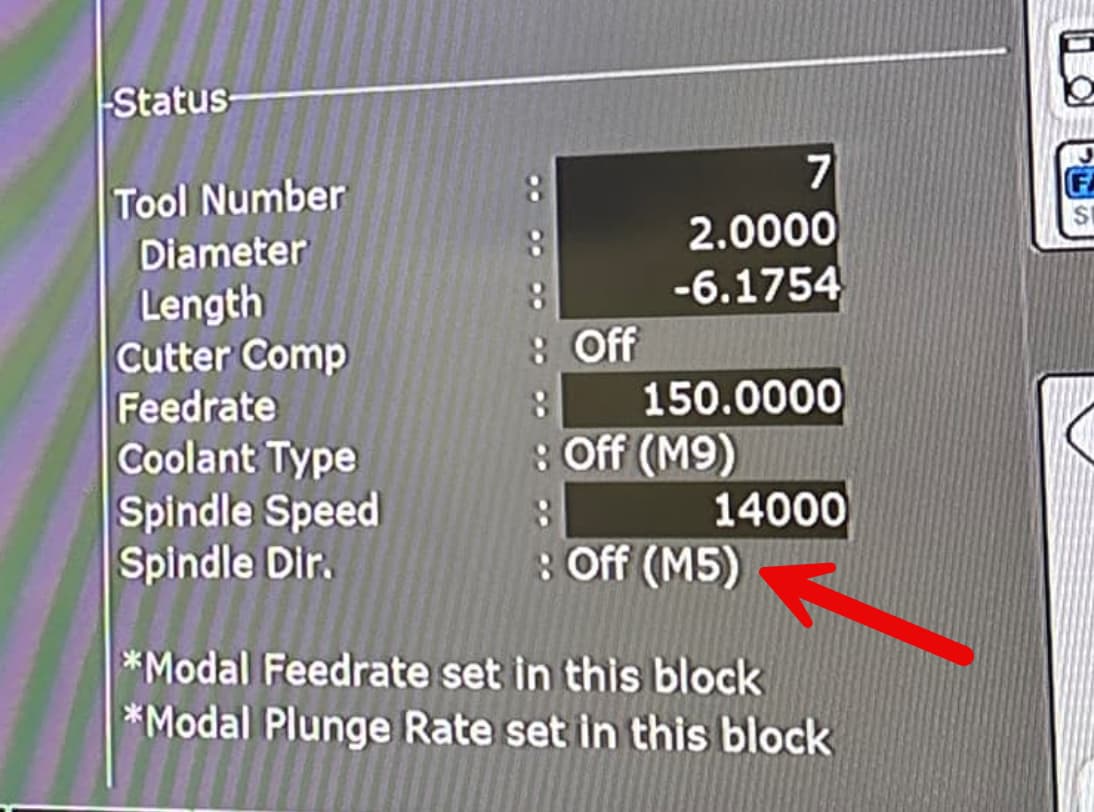
I followed the recent YouTube video posted about using Intercon to flatten slabs. Everything went exactly as it should with the G-code generation and part zeros. However, when I run the job, the motor won’t spin, but the machine will run the toolpaths.
Any ideas where im going wrong? I can draw jobs in Aspire, export and run them, no problem, but the motor won’t spin up this time around after following along with the video.
I have header, tool, face, and program exactly as the video I assumed after entering the feed rate and spindle speed in the facing section that it would automatically handle that portion. What am I missing?
So, I watched the YT video on using Intercon to create a facing toolpath. Overall I have liked this quick and easy method. Like the person in this thread, the first time I created the g-code I didn’t have a command to turn the spindle on - so this thread was helpful on that front. But after using this successfully a few times - I’m feeling slightly confused about how the Z-axis is being handled.
Normally when my Z-axis is fully raised - my Z-axis in the DRO is reading around 12”. When I go down to the work surface, and set Z zero and then come back up - I am still in positive numbers on the DRO. If I’m using a Vcarve generated pocketing toolpath - if I want to repeat the cut I just manually go back and set the Z-axis position to whatever it is + the depth of cut. I rinse and repeat this over and over until I’ve gotten things where I want it.
Using Intercon approach - it is just feeling off when after the Intercon G-code finishes and the spindle raises back up - the DRO is showing my Z-axis as a negative number. Not my usual positive number.
So after playing with the slabslayer web app for just a few minutes - I have one suggestion … I think it might be help to relabel “depth” to “depth of cut”.
I think I was in a V-carve autopilot mode when I was specifying the length, width, and THICKNESS of my slab. I was slightly confused for a sec - until I realized depth was not thickness, but rather DOC.
I’ll see if I can make that change… probably will take me a while
PS, CAREFULLY check over that G code you get from that app. This was a little experiment I did. It works well for me, but I have not battle tested it with every possible variation one could put into it.
best thing to do is make your G code with it, and preview in CNC12 in detail using GRAPH.